


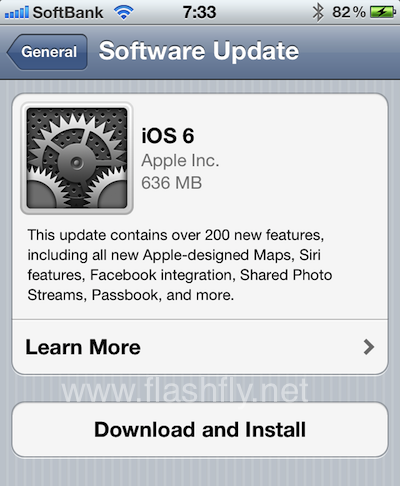
มาแล้วตามสัญญา กับระบบปฏิบัติการไอโอเอสเวอร์ชั่นล่าสุด iOS 6 ซึ่งเปิดให้ผู้ใช้ไอโฟน, ไอแพด และไอพอดทัชเก่า สามารถทำการดาวน์โหลดมาอัพเดตได้แล้ววันนี้
โดยก่อนการมาถึงของไอโฟน 5 ในวันศุกร์นี้ สาวกของแอปเปิ้ลจะได้ลิ้มรสกับระบบปฏิบัติการไอโอเอสเวอร์ชั่นล่าสุด iOS 6 ก่อน โดยเปิดให้อัพเดตกันผ่านทาง over-the-air แล้ว สำหรับผู้ใช้ไอโฟน 4เอส, ไอโฟน 4, ไอโฟน 3จีเอส, ไอแพดเจนสาม, ไอแพด 2 และไอพอดทัชเจนสี่และห้า โดยการเข้าไปที่เมนูตั้งค่า จากนั้นเลือก ‘General’ แล้วเลือก ‘Software Update’ ซึ่งระบบจะทำการดาวน์โหลดและติดตั้งโดยตรงลงบนตัวอุปกรณ์
นอกจากนี้ ผู้ใช้ยังสามารถดาวน์โหลดและติดตั้ง iOS 6 ได้ผ่านทางการเชื่อมต่อกับเครื่องแม็ค หรือคอมฯวินโดวส์พีซี โดยใช้โปรแกรม iTunes ได้ โดยการปรับปรุงจะประกอบไปด้วย คุณสมบัติใหม่กว่า 200 รายการ อาทิ แอปฯแผนที่ที่แอปเปิ้ลได้ดีไซน์ขึ้นใหม่, ความสามารถของโปรแกรมผู้ช่วยเสียง ‘สิริ’ ที่ช่วยให้คุณสามารถค้นหาผลการแข่งขันกีฬา การจองโต๊ะร้านอาหารสำหรับมื้อค่ำ หรือ ตรวจสอบตารางการฉายภาพยนตร์ เป็นต้น, การรวมการติดตั้งเฟสบุ๊ค, พาสบุ๊ค, กล้องถ่ายรูปที่เพิ่มโหมดการถ่ายภาพแบบพาโนรามา และอื่นๆอีกมากมาย
This update contains over 200 new features, including the following:
- Maps
- Apple designed vector based maps
- Turn-by-turn navigation with spoken directions on iPhone 5, iPhone 4S, iPad Wi-Fi + Cellular (2nd and 3rd generation)
- Real-time traffic information
- Flyover for photo-realistic, interactive 3D views of major metro areas on iPhone 5, iPhone 4S, iPad (3rd generation), and iPod touch (5th generation)
- Local search results with Yelp photos, ratings, reviews, and available deals
- Siri integration for requesting directions and finding places along a route
- Siri improvements
- Sports: scores, player stats, game schedules, team rosters, and league standings for baseball, basketball, football, soccer and hockey
- Movies: trailers, showtimes, reviews and facts
- Restaurants: reservations, reviews, photos and information
- Send a Tweet
- Post on Facebook
- App launch
- Eyes Free in supported automobiles
- Local search available in Siri supported countries (availability may be limited during initial rollout)
- Additional country and language support for Canada (English and Canadian French), China (Mandarin), Hong Kong (Cantonese), Italy (Italian), Korea (Korean), Mexico (Spanish), Spain (Spanish), Switzerland (Italian, French, German), Taiwan (Mandarin), US (Spanish)
- Supported on iPhone 5, iPhone 4S, iPad (3rd generation) and iPod touch (5th generation)
- Facebook integration
- Single sign-on from Settings
- Post from Photos, Safari, Maps, App Store, iTunes, Game Center, Notification Center and Siri
- Add location and choose audience for any post
- View up-to-date Facebook profile photos and contact information in Contacts
- View Facebook events and birthdays in Calendar
- Like content and see your friends’ Likes in App Store and iTunes Store
- Shared Photo Streams
- Share selected photos with the people you choose
- Friends can view shared photos in Photos app, iPhoto and Apple TV
- Friends can like and make comments on individual photos
- Passbook
- One place for boarding passes, store cards, movie tickets and other passes
- Barcode display for boarding flights, buying coffee, getting into movies and other actions
- Passes displayed on Lock Screen based on time or location
- Passes can be automatically updated
- Supported on iPhone and iPod touch
- FaceTime improvements
- FaceTime over cellular support for iPhone 5, iPhone 4S and iPad Wi-Fi + Cellular (3rd generation)
- Receive FaceTime calls, sent to your iPhone number, on your iPad and iPod touch
- Phone improvements
- Do Not Disturb to suppress incoming calls and notifications
- ‘Reply with message’ option when declining a call
- ‘Remind me later’ option based on time or location when declining a call
- Mail improvements
- VIP mailbox to quickly access mail from important people
- Flagged email mailbox
- Insert photos and videos when composing email
- Open password protected Office docs
- Pull down to refresh mailboxes
- Per account signatures
- Safari improvements
- iCloud tabs to see open pages on all your devices
- Offline Reading List
- Photo upload support
- Full screen landscape view on iPhone and iPod touch
- Smart app banners
- JavaScript performance improvements
- App Store and iTunes Store improvements
- Updated store design
- iTunes Preview history
- Complete my season
- Complete my album
- Game Center improvements
- Challenge friends to beat high scores and achievements
- Post high-scores and achievements to Facebook and Twitter
- Friend recommendations based on your Facebook friends
- Accessibility improvements
- Guided Access to limit device to one app or restrict touch input on certain areas of the screen
- VoiceOver integration with Maps, AssistiveTouch and Zoom
- Support for Made for iPhone Hearing Aids for iPhone 5 and iPhone 4S
- Improved privacy controls for Contacts, Calendars, Reminders, Photos and data shared over Bluetooth
- Reminders can be reordered in the Reminders app
- Custom vibrations for alerts on iPhone
- Clock app for iPad
- Clock alarm with song
- Search all fields in Contacts
- Automatic movie mode for improved video sound quality
- Definitions of a selected word for Chinese, French, German and Spanish
- New keyboard layouts for French, German, Turkish, Catalan, Arabic and Icelandic
- Keyboard shortcuts shared across devices via iCloud
- Bluetooth MAP support
- Global network proxy for HTTP
- Features for China
- Baidu web search
- Sina Weibo integration
- Share videos to Tudou
- Share videos to Youku
- Improved text input for handwriting and Pinyin
- Bug fixes
ที่มา – pantip