

ช่วงสัปดาห์ที่ผ่านมา หลายคนที่เลื่อนดูฟีดในโซเชียลมีเดีย คงได้เห็นเพื่อนๆ แชร์ภาพโมเดลฟิกเกอร์วางบนโต๊ะ เหมือนถูกสร้างขึ้นด้วยเครื่องพิมพ์ 3D ไม่ว่าจะเป็นฟิกเกอร์ของคนหรือรถยนต์คันโปรด ซึ่งความจริงแล้วเป็นผลงานการสร้างภาพด้วย AI และไม่ว่าใครก็สามารถทำขึ้นมาได้ง่ายนิดเดียว

โมเดล AI ส่วนใหญ่สามารถสร้างภาพโมเดลฟิกเกอร์ 3D ได้อยู่แล้ว แต่ที่กำลังได้รับความนิยมเป็น AI ของ Gemini ซึ่งทีมงาน @flashfly ได้ทดลองใช้แล้ว บอกเลยว่า ง่าย เร็ว และ ฟรี!! เพียงทำตามขั้นตอนต่อไปนี้…
- เตรียมรูปภาพที่ต้องการสร้างเป็นโมเดลฟิกเกอร์ 3D จะเป็นภาพถ่ายบุคคลหรือวัตถุใดๆ ก็ได้
- เข้าไปที่เว็บไซต์ Gemini ของ Google (รองรับทั้งคอมพิวเตอร์และมือถือหรือแท็บเล็ต)
- กดปุ่ม + เพื่ออัปโหลดรูปภาพที่เตรียมไว้ (หากเป็นรูปภาพบุคคล จะเป็นภาพแบบเต็มตัวหรือครึ่งตัวก็ได้)
- จากนั้นคัดลอกตัวอย่าง Prompt ด้านล่าง ไปวางในช่องข้อความของ Gemini แล้วกดส่ง

ตัวอย่าง Prompt
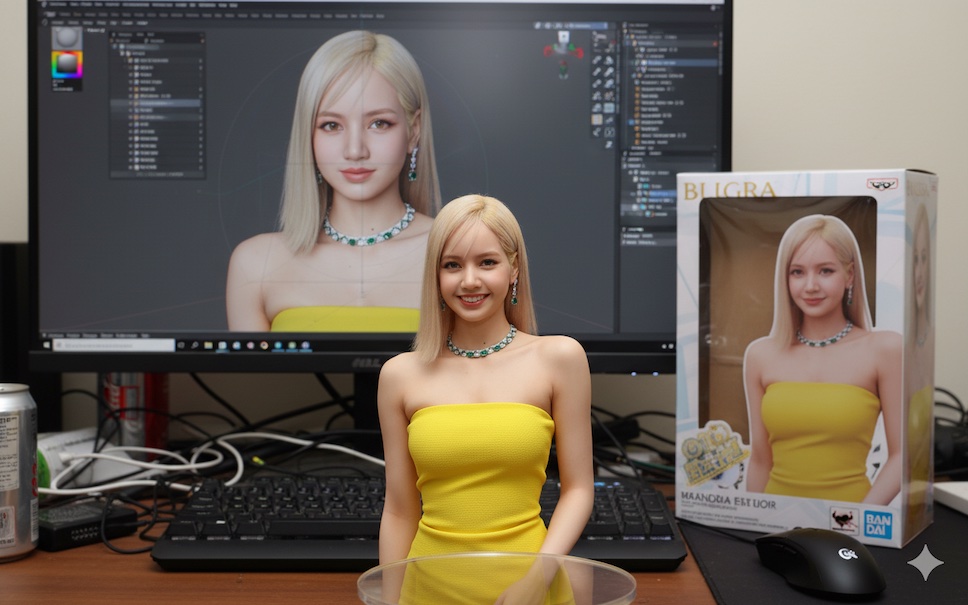
Use the nano-banana model to create a 1/7 scale commercialized figure of the character in the illustration, in a realistic style and environment. Place the figure on a computer desk, using a circular transparent acrylic base without any text.
On the computer screen, display the ZBrush modeling process of the figure. Next to the computer screen, place a BANDAI-style toy packaging box printed with the original artwork.
ผลลัพธ์ที่ได้

ทั้งนี้ ผู้ใช้งานสามารถแก้ไขปรับแต่ง Prompt เพื่อให้ได้ผลลัพธ์ที่แตกต่างได้อีก เช่น เปลี่ยนสเกลของฟิกเกอร์ หรือ เปลี่ยนสไตล์จาก BANDAI เป็นสไตล์อื่นๆ อย่าง LEGO
หรืออาจจะใช้ Prompt อื่น รวมถึงโมเดล AI ตัวอื่นก็ได้ เช่นตัวอย่างด้านล่างเป็นผลงานของ ChatGPT

ตัวอย่าง Prompt
turn this photo into a Full 3D character figure. Behind it, place a box with the character’s image printed on it, and a computer showing the Blender modeling process on its screen. In front of the box, add a round plastic base with the character figure standing on it. Make the PVC material look clear, and set the scene indoors if possible